


Streamlining Compliance Through Automation
Introduction
At Tezign, I designed Content Inspection, an automated system for large-scale content review. It ensures brand consistency and compliance while streamlining workflows with Inspection Batches and Custom Rulesets.
TIMELINE
Aug 2024 (3 weeks)
TEAM
1 UXD (me)
1 PM
3 Devs
TOOL
Figma
kEYWORD
0 to 1
B2B
BACKGROUND
What is content inspection?
Content inspection is the process brands use to make sure their marketing content follows specific rules. For example, in an anniversary campaign, all ads need to include set visual elements and keywords while avoiding any blacklisted terms.
What do clients want?
The client wants to automatically check that campaign content meets their standards—for example, verifying that required visuals and keywords are included, and ensuring compliance with platform rules (e.g., TikTok).
I want to ensure that the online and offline marketing content published for the anniversary campaign complies with the standards I have set.
Check if anniversary visual elements are included.
Check if anniversary-specific marketing keywords are included.
Check if the content complies with the marketing platform rules for the anniversary campaign (Douyin).
RESEARCH
User Persona
Our users come from companies across different brands. Despite their diverse backgrounds, they share significant commonalities. Through in-depth interviews and conversations with clients, I identified two primary user personas:
User Flow
To better understand user roles and behavior, and ensure the product structure matches user scenarios and needs, we summarized the following flow based on client interviews:

Product Structure
Based on the processes and behaviors of these three user roles, the product is divided into three main functional areas.

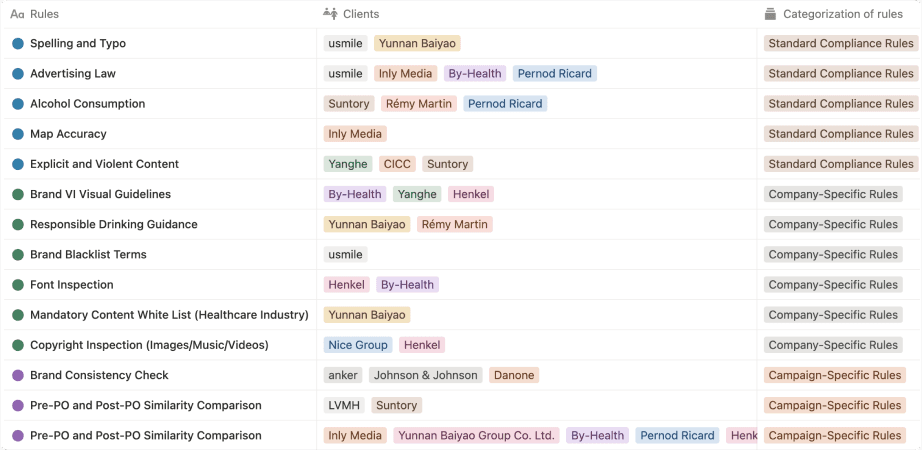
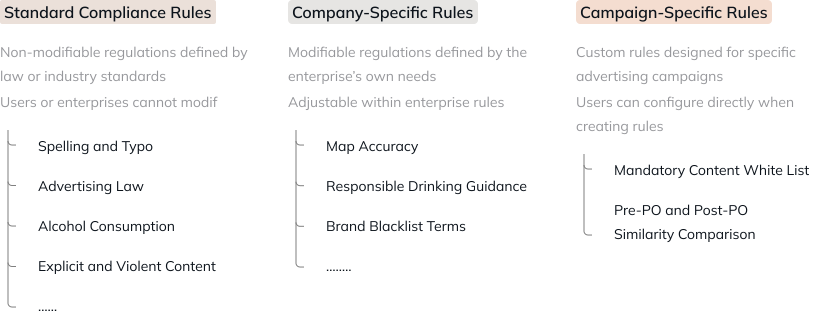
Inspection Rule Information Architecture
I grouped client needs into three categories and validated the structure with a 20-sample card-sorting study. This architecture helps users quickly understand inspection logic and find required rules efficiently.

DESIGN ITERATION
Design challenge 1
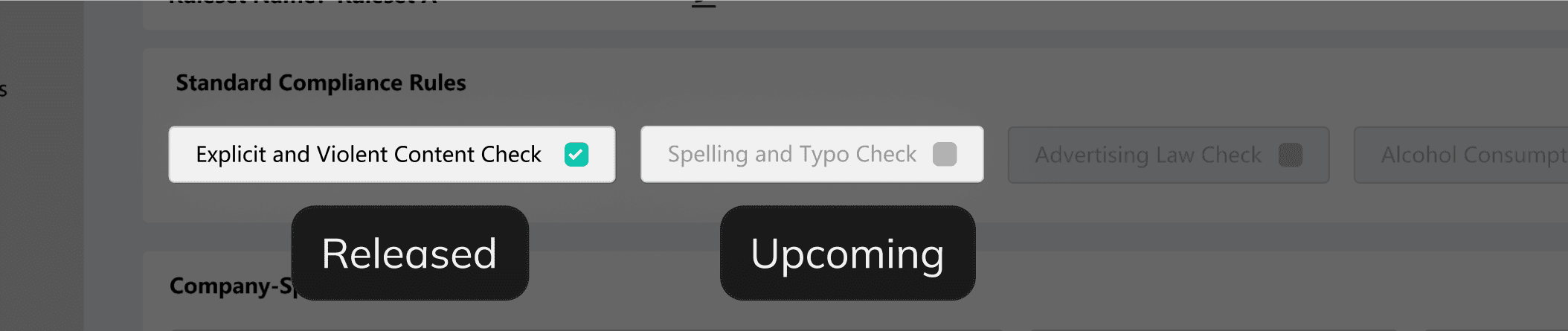
HMW present both current and upcoming features to spark anticipation for future releases?
With limited scope in the first iteration, we must indicate future capabilities. Clear signaling helps users distinguish present functionality from what’s planned, shaping expectations across iterations.
Ambiguous states increase cognitive load
Users can’t tell if features are disabled or unreleased, leading to confusion and frustration instead of anticipation.
Visual noise weakens hierarchy
Excessive “Coming Soon” labels dilute focus, distracting from core functionality and reducing scannability.

Low-contrast text strains perception
Gray states mark unavailable features but create visual fatigue and lower readability.

Refined solution
Gray states mark unavailable features but create visual fatigue and lower readability.

Design challenge 2
HMW use a minimal UI to clearly convey hierarchy and logical relationships between elements, along with their interactions, so that users can understand them at a glance?
A key design challenge is managing campaign rules, specifically the keyword inputs under “Mandatory Keywords.”

Low-contrast text strains perception
Gray states mark unavailable features but create visual fatigue and lower readability.
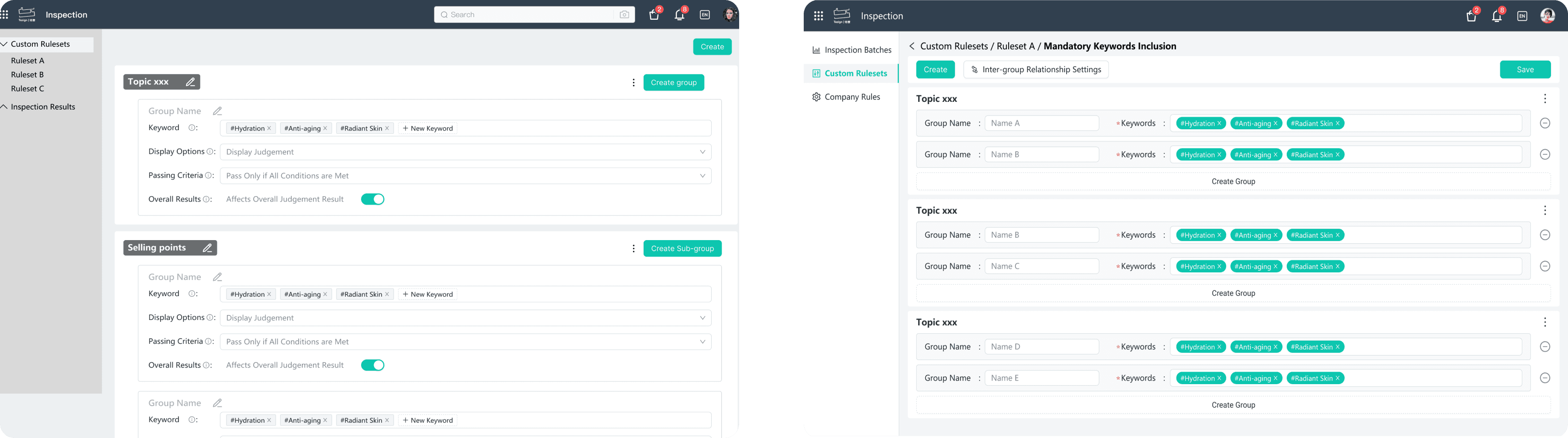
Disrupted User Flow
Unintuitive interaction flows lead to unnecessary errors or difficulty locating action controls.
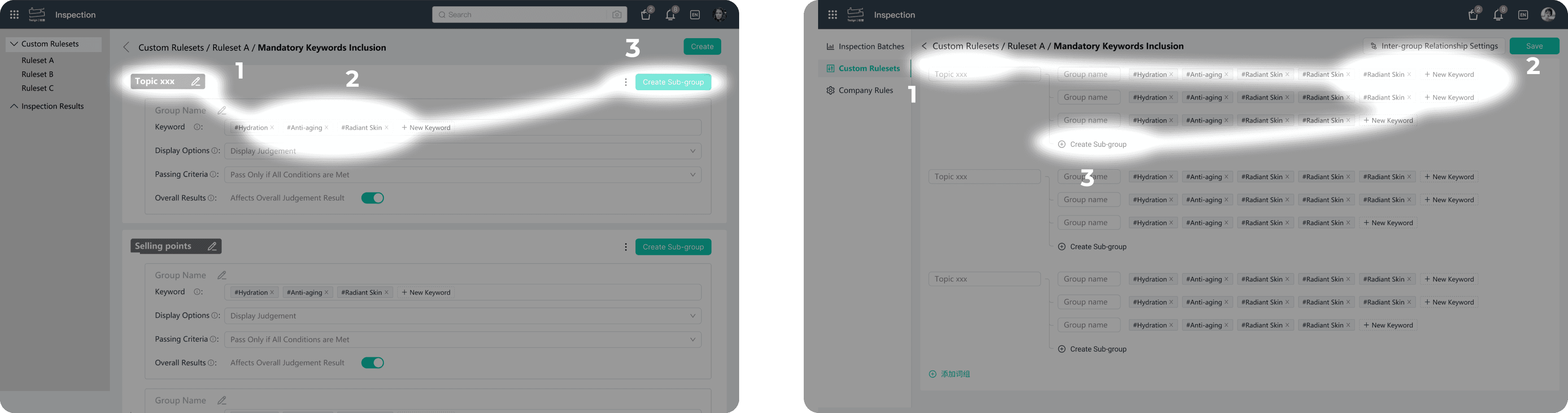
Excessive Interaction Load
Since “Mandatory Keywords” is only an attribute of content inspection, placing it on a standalone page adds interaction overhead and increases user effort.

Refined solution
Remove redundant subgrouping lines and blocks; use tree-like connectors to strengthen hierarchy.
Adopt a top-down interaction flow to reduce lateral scanning and cognitive load.
Use a lightweight drawer interaction so users can manage keywords inline without leaving the current context.

FINAL DESIGN
Inspection Batches - Create Batch
Start a new batch with just a few clicks! Set up basic details (like name and description), choose a ruleset, and upload the content you want to inspect. You’ve got options:
Create a fresh ruleset
Reuse an existing ruleset
Copy and tweak a previous ruleset
With everything ready, you’re set to inspect the content in this batch!
Inspection Batches - Details
Dive into batch details—see essential info like the name and last update, get a snapshot of the applied ruleset, and review inspection results for uploaded content. Need more to inspect? Just upload new content directly from here!
Inspection Ruleset - Create Ruleset
Pick and choose from three well-organized rule categories to build your perfect ruleset. Plus, you can set mandatory keywords just for this ruleset—especially useful for campaign content, like keeping brand keywords consistent in ads or meeting compliance keywords across regions.
Company Rules - Blacklist and Whitelist Keywords
Manage your company's blacklist and whitelist keywords with ease! Bulk add, export, or adjust the risk level for each keyword, and enable or delete as needed to keep everything on point.
REFLECTION
01 Align Early, Align Often
One thing I'd do differently is sync with the PM much earlier in the process — even just sharing quick sketches before diving into full designs. A few rough iterations upfront can save a huge amount of rework down the line. Misaligned directions are so much easier to fix at the sketch stage than after you've already built out the design.
02 Map Out User Workflows Before You Design
Working on a B2B product taught me that every company operates differently. Taking the time to systematically map out the different workflows our users might have — rather than designing for just one — was crucial. It pushed us to think about flexibility and customization from the start, which is what makes a B2B product scalable across different clients.
03 Build Your Own Knowledge Base During Onboarding
B2B products come with a steep learning curve — there's a lot of domain knowledge to absorb quickly. Looking back, I'd invest more time upfront in organizing my own notes and building a personal knowledge base as I onboarded. Having a structured reference to go back to would have saved a lot of time, and asking questions early — rather than waiting until I was stuck — would have made the whole ramp-up much smoother.